

Salik Dubai 2026: Recharge, Check Your Balance by Plate, Timings, Fines, and Rates
16 June 2026
Dubai
LicensePlate.ae Team
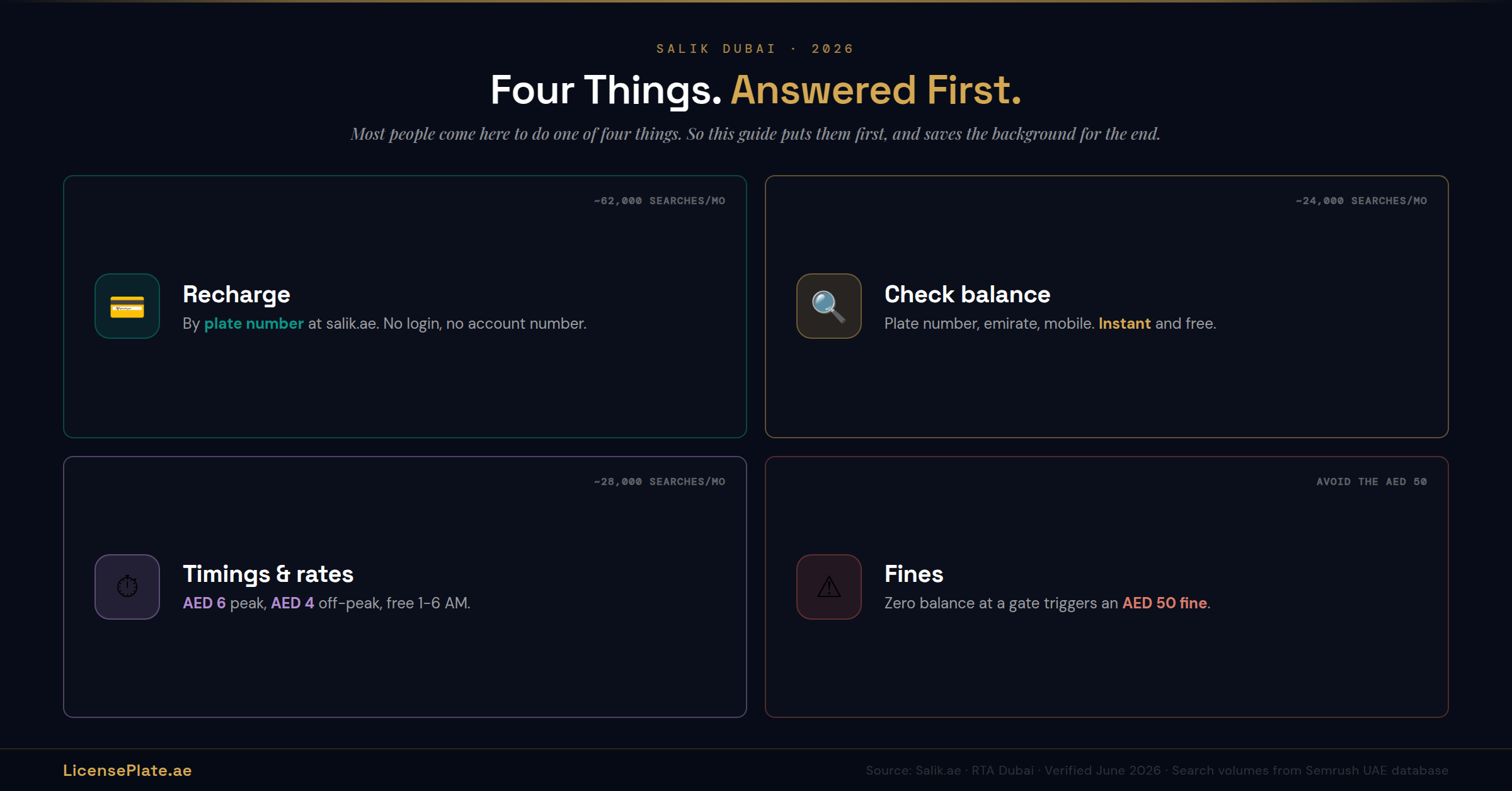
Most people land here to do one of four things: recharge their Salik, check their balance, find out the toll timings, or sort out a fine. This guide puts those first, answers each in a few seconds, and saves the background for the end where it belongs. If you came to get something done, the next four sections are all you need.
Quick answer: Recharge Salik in seconds at salik.ae using Quick Recharge with just your plate number, no login needed, or through the Smart Salik or DubaiNow apps. Check your balance the same way: salik.ae, enter your plate number and emirate, and it shows instantly. Tolls in 2026 run on dynamic pricing: AED 6 during peak hours, AED 4 off-peak, and free between 1 AM and 6 AM. If your balance hits zero and you cross a gate, you get an AED 50 fine, so keep it topped up.
How to Recharge Salik (Including by Plate Number, No Account Needed)
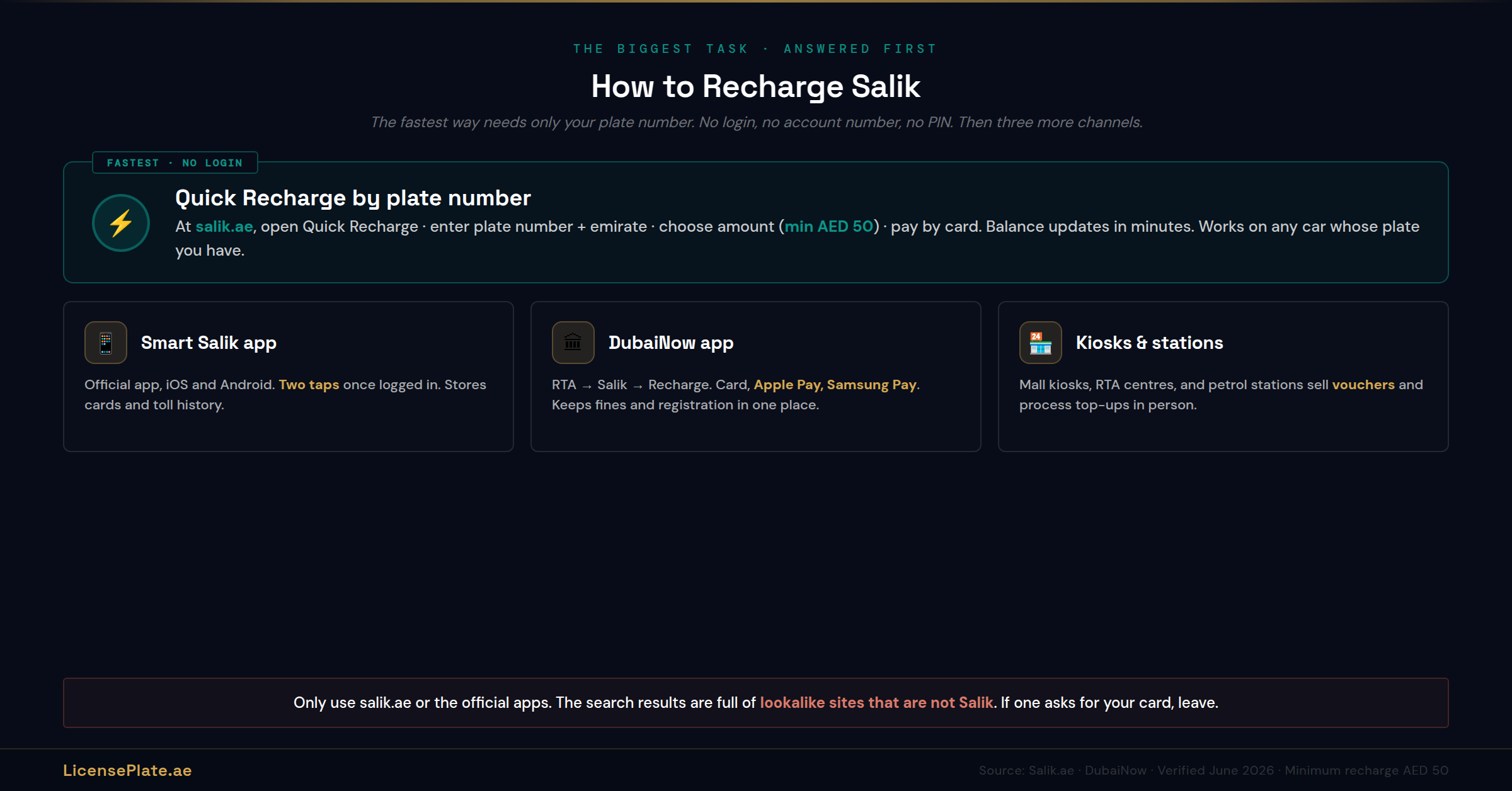
The fastest way to recharge is the Quick Recharge tool on the official Salik website, which only needs your plate number. No login, no account number, no PIN. Here is the full picture, quickest first.
Quick Recharge by plate number (fastest, no login)
1. Go to salik.ae and open Quick Recharge, sometimes labelled recharge without account.
2. Enter your plate number and the issuing emirate.
3. Choose the amount. The minimum recharge is AED 50.
4. Pay by card. The balance updates within a few minutes. If it has not moved after about 15 minutes, call 800-SALIK (800 72545).
This is the method most people actually want, because it works without remembering an account number, and it works for a car that is not even yours, which matters when you are clearing a balance before selling or buying a plate.
The other recharge channels
Smart Salik app. The official app (iOS and Android) recharges in a couple of taps once you are logged in, and stores your cards and toll history.
DubaiNow app. Open RTA, then Salik, then Recharge. Pays with card, Apple Pay, or Samsung Pay. Useful if you already use DubaiNow for fines and registration, because it keeps everything in one place.
Kiosks and fuel stations. Salik kiosks in malls and RTA centres, and most petrol stations, sell recharge vouchers and process top-ups in person. The option for anyone who would rather not do it online.
Recharge vouchers. Sold at fuel stations and retailers. You buy a voucher and apply its code to your account, which is handy as a gift or for someone managing a balance without card access.
Whichever channel you use, only use the official Salik website, the official apps, or in-person retailers. The search results for Salik recharge are full of lookalike sites that are not Salik. If a site that is not salik.ae or an official app asks for your card to recharge, leave it.
How to Check Your Salik Balance by Plate Number
Checking is free, takes under a minute, and does not need an account. The plate-number method on the Salik website is the one to remember.
Check by plate number on the website (no login)
1. Go to salik.ae and open Check Balance.
2. Enter your plate number, the issuing emirate, and your registered mobile number.
3. Your current balance appears on screen instantly. No OTP, no login.
That is the whole process. Because it works from the plate alone, you can check the balance on any vehicle whose plate you have, which is exactly what you want when you are checking a car before a plate transaction.
The other ways to check
Smart Salik and DubaiNow apps. Both show your live balance and recent toll history on the home screen once you are signed in. Best if you want the running history, not just the number.
By phone. Call 800-SALIK (800 72545) and the automated service reads your balance after you confirm your details. From outside the UAE, Salik can be reached on its international line.
At a kiosk. Salik kiosks in malls and RTA centres display your balance and let you top up in the same visit.
Set a habit around it. Frequent Sheikh Zayed Road or Al Ittihad Road drivers should check every few days; everyone else, weekly. The point of checking is to never hit zero, because zero is where the fines start.
Salik Timings and Rates in 2026: When You Pay AED 6, AED 4, or Nothing
This is the part that changed, and the part most older guides still get wrong. Since early 2025 Salik runs on dynamic pricing, so what you pay depends on when you cross, not a flat rate. Here is the 2026 picture.
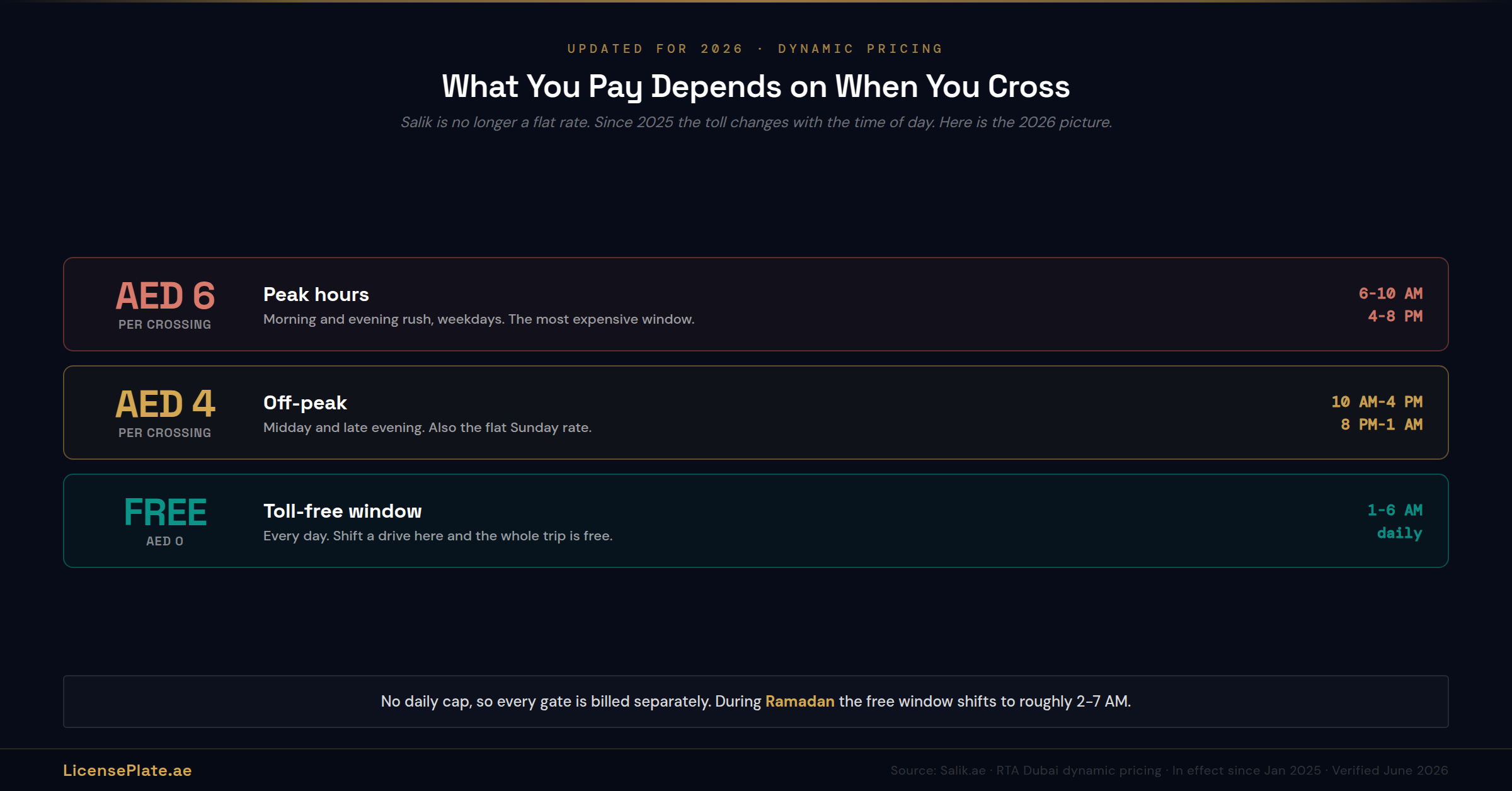
Peak hours, AED 6 per crossing: 6:00 AM to 10:00 AM and 4:00 PM to 8:00 PM, on weekdays. The morning and evening rush.
Off-peak, AED 4 per crossing: 10:00 AM to 4:00 PM and 8:00 PM to 1:00 AM. The middle of the day and the late evening.
Free, AED 0: 1:00 AM to 6:00 AM, every day. If you can shift a drive into this window, the whole trip is toll-free.
Sundays: a flat AED 4 all day, outside the free overnight window.
Ramadan: rates hold, but the free overnight window shifts to roughly 2:00 AM to 7:00 AM, and peak timings adjust. Check the official Salik notices each Ramadan for the exact hours.
Two things worth knowing about how charges stack. There is no daily cap, so every gate you pass is billed separately, and a cross-city run on Sheikh Zayed Road during peak can hit three or four gates, which adds up fast. And paired gates, where two gates sit close together in the same direction, charge once if you pass both within the hour. Planning a route around the free window, or around a parallel road like Al Khail that has no gates, is how regular commuters cut the cost.
Salik Fines and How to Avoid Them
Salik fines are almost always about one thing: crossing a gate with no balance. Avoid that and you avoid the fines.
The insufficient-balance fine. Cross a Salik gate with a zero or negative balance and you are charged an AED 50 fine, and it can repeat for continued crossings while the account stays empty. The toll itself is a few dirhams; the fine for not having those few dirhams loaded is far more. Keeping a small buffer on the account is the entire fix.
The unregistered-vehicle situation. If a vehicle uses Salik roads without a properly registered and active tag, the system captures the plate by camera and issues a violation. Any car driven regularly on Dubai toll roads needs an active tag, full stop.
To check for Salik violations specifically, your balance and account pages on salik.ae and the apps show outstanding amounts. Salik charges and any related traffic fines also surface in the unified UAE fines systems. The UAE traffic fine check guide covers how to find and clear every fine tied to a plate across all seven emirates from one portal, which is the cleanest way to confirm a plate is completely clear, Salik included.
Salik When You Buy or Sell a Car or Plate
Here is the part no other Salik guide covers, and the part that matters most if you are trading a plate or a car. Salik is tied to a vehicle and an account, and a transaction is exactly where people get the handover wrong.
The tag is linked to the vehicle, the account is linked to you
A Salik tag is registered to one specific vehicle, and the prepaid account behind it is registered to a person. When the car changes hands, those two things need to be sorted, not left to chance. The old tag should be removed and the account updated, so you are not paying tolls for a car you no longer own, and the new owner is not driving on a tag still tied to your account.
Clear the Salik balance and any Salik fines before a transfer
Just like unpaid traffic fines, outstanding Salik charges and balance-related fines tied to a vehicle can complicate a clean handover and a registration renewal. Before you sell, clear the Salik position so the car and its file are clean. Before you buy, check it. The plate-number balance check above works on a car you do not yet own, which is the point. Run it as part of your pre-purchase checks.
If you are selling the plate and keeping or changing the car
When a number plate moves separately from the car, through retention or reassignment, the Salik tag stays with the vehicle, not the plate. The plate is the asset you are trading; the tag and toll account belong to the car. Keep the two mentally separate so you do not accidentally hand over a toll account with a plate sale, or leave a tag active on a car you have sold. The plate management guide covers moving a plate cleanly, the guide to selling a plate covers listing and closing once it is retained, and the pre-purchase verification checklist covers confirming everything tied to a plate is clear before money moves.
The common thread with the rest of plate ownership: a plate is an asset, and the admin attached to the car it sits on, fines, registration, Salik, needs a deliberate decision at the moment of a transaction rather than being left to sort itself out.

How Salik Works, Briefly
If you are new to Dubai and just want the mechanics, here they are without the engineering lecture. Salik is Dubai's barrier-free electronic toll system, run by the RTA and launched in 2007. You buy a small RFID tag for AED 100, which includes AED 50 of starting balance, and stick it to your windshield behind the rearview mirror. When your car passes under one of the overhead toll gates, a camera and reader detect the tag and deduct the toll from your prepaid account automatically, at full speed, with no booth and no stopping. You keep the account topped up; the system does the rest.
There are 10 active Salik gates as of 2026, positioned on the busiest roads and crossings: along Sheikh Zayed Road, on the Creek bridges (Al Maktoum, Al Garhoud), at Al Mamzar, Airport Tunnel, Al Safa, Al Barsha, and Jebel Ali. New gates are added as the road network grows, so the count rises over time. Salik itself became a publicly listed company on the Dubai Financial Market in 2022, which is why you will also see Salik share-price results when you search the name.
Frequently Asked Questions
Q: How do I recharge Salik by plate number?
Use Quick Recharge at salik.ae, which needs only your plate number and emirate, no login or account number. Choose an amount (minimum AED 50) and pay by card. The Smart Salik and DubaiNow apps also recharge quickly once you are signed in. The balance updates within a few minutes.
Q: How do I check my Salik balance for free?
Go to salik.ae, open Check Balance, and enter your plate number, emirate, and registered mobile number. The balance appears instantly with no login and no charge. The Smart Salik and DubaiNow apps show it too, along with your toll history, and you can call 800-SALIK (800 72545).
Q: What are the Salik charges in 2026?
Salik uses dynamic pricing: AED 6 per crossing during peak hours (6 to 10 AM and 4 to 8 PM weekdays), AED 4 off-peak (10 AM to 4 PM and 8 PM to 1 AM), and free from 1 AM to 6 AM daily. Sundays are a flat AED 4 outside the free overnight window. There is no daily cap, so each gate is billed separately.
Q: Is Salik free at any time?
Yes. Salik is free every day between 1:00 AM and 6:00 AM. During Ramadan the free window shifts to roughly 2:00 AM to 7:00 AM. Shifting a drive into the free window makes the trip toll-free, which is the simplest way to cut Salik costs.
Q: What happens if I have no Salik balance?
Crossing a gate with a zero or negative balance triggers an AED 50 fine, which can repeat for continued crossings while the account is empty. The toll is only a few dirhams, so keeping a small buffer loaded avoids a much larger fine. Recharge immediately if you have gone negative.
Q: How much does a Salik tag cost?
A Salik tag costs AED 100, which includes AED 50 of starting toll balance. You buy it from the Salik website, RTA centres, or petrol stations, register it to your vehicle, and stick it on the windshield behind the rearview mirror. The minimum recharge afterward is AED 50.
Q: Can I check or recharge Salik for a car I do not own?
Yes. The plate-number methods for both checking balance and Quick Recharge work from the plate alone, without the owner's login. This is useful when you are buying or selling a plate or car and need to confirm the Salik position is clear before the deal completes.
Q: What happens to Salik when I sell my car?
The tag is registered to the vehicle and the prepaid account to a person, so both need sorting at sale. Remove the old tag, update or close the account, and clear any outstanding balance or related fines first. Leaving a tag active on a sold car means paying tolls for a vehicle you no longer own.
Q: How many Salik gates are there in Dubai?
There are 10 active Salik gates as of 2026, on the busiest roads and crossings including Sheikh Zayed Road, the Creek bridges, Al Mamzar, the Airport Tunnel, and Jebel Ali. New gates are added as Dubai's road network expands, so the number increases over time.
Q: Are other emirates covered by Salik?
No. Salik is Dubai's toll system only. Abu Dhabi runs a separate toll system called Darb. The northern emirates have no road tolls. A Dubai Salik tag does not pay Abu Dhabi Darb tolls, and the two accounts are separate.
Salik is meant to be invisible: load the account, drive, forget about it. The only times it needs your attention are when the balance runs low, when you want to time a drive into the free window to save money, and when you are buying or selling the car or plate it is attached to. Handle those three and Salik goes back to being background noise.
That last one is the piece most guides miss and the one worth holding onto here. Salik, like fines and registration, is admin tied to a vehicle, and a plate transaction is exactly where that admin has to be settled deliberately rather than left to chance. If you are anywhere near buying or selling, treat the Salik check as part of the same pass as the fine check and the registration status. For the full picture on trading the plate itself, the Dubai plate guide covers buying and selling from both sides, and the plate value calculator tells you what a clean plate is worth once you have confirmed it is clear.
Delete Comment?
Are you sure you want to delete this comment? This action cannot be undone.
Delete Article?
Are you sure you want to delete this article? This will also delete all comments. This action cannot be undone.