

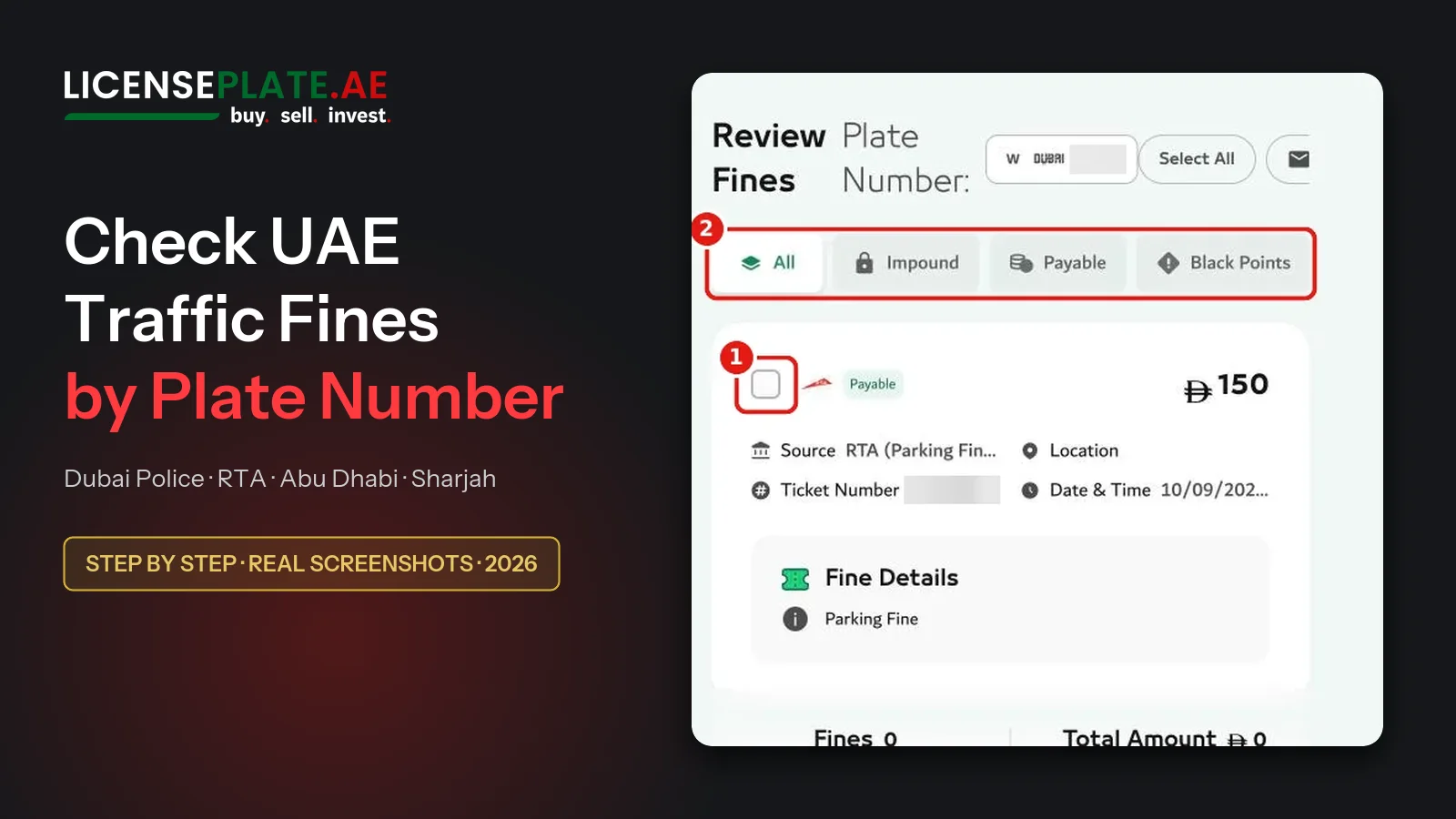
How to Check & Pay Traffic Fines in the UAE by Plate Number – Step by Step (2026)
Quick answer: To check traffic fines in the UAE by plate number, open the Dubai Police fines page or the RTA fines page. Choose the emirate that issued the plate, then enter the plate code and the plate number. Both portals are free to use and need no account. They also accept plates from all seven emirates. In Abu Dhabi you pay through TAMM with UAE PASS.
This guide walks through every screen with real screenshots from the official portals. We ran the checks on 13 October 2026 with our own plate, a Dubai private plate, and blurred the personal data. The numbered red boxes in each picture match the numbered steps in the text.
Which portal for which emirate? (overview)
| Plate / fine from | Check online | Login needed? | Search by |
|---|---|---|---|
| Dubai | Dubai Police or RTA (ums.rta.ae) | No, “Continue as Guest” | Plate, licence, traffic code (TC) number, fine number |
| Abu Dhabi | TAMM (Abu Dhabi Police). The Dubai Police form also lists Abu Dhabi plates. | TAMM: yes, UAE PASS | Your identity (Emirates ID via UAE PASS) |
| Sharjah, Ajman, Umm Al Quwain, Ras Al Khaimah, Fujairah | Dubai Police form (all five are in the “Plate Issuing Authority” list), the federal MOI UAE app | Dubai Police: no | Plate, licence, TC number |
| Salik and parking fines (Dubai) | RTA (ums.rta.ae). In our test only RTA showed the Salik fine. | No | Plate |
Before you start: what you need
For a search by plate number you need four details. All of them are printed on the plate and on your vehicle registration card (mulkiya):
- Plate source (issuing emirate): Dubai, Abu Dhabi, Sharjah, Ajman, Umm Al Quwain, Ras Al Khaimah or Fujairah.
- Plate category: usually “Private”. Taxis, motorcycles, public transport and other vehicles have their own categories. RTA asks for it, Dubai Police does not.
- Plate code: the letter or number next to the plate number (for example A, AA or 1). Plates without a code exist in some emirates.
- Plate number: up to five digits.
No plate at hand? Search by driving licence number, by the traffic code (TC) number or by the fine (ticket) number instead. You find the TC number, also called the traffic file number, on your mulkiya. Our mulkiya guide explains every field on the card.
Dubai Police fine check: step by step
The Dubai Police “Fines Inquiry and Payment” service is the most complete public check. It shows fines on a vehicle plate, a driving licence or a traffic code. It accepts plates from every emirate and needs no login. This is the fastest way to do a Dubai Police fine inquiry.
Step 1: open the service and continue as guest
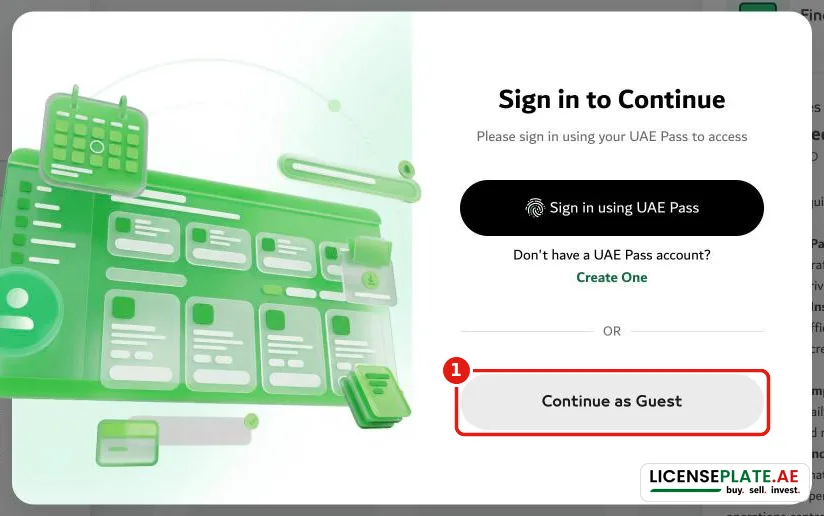
Open dubaipolice.gov.ae → Services → Fines Inquiry and Payment. A window offers “Sign in using UAE Pass” or “Continue as Guest” (1). For a check by plate number, “Continue as Guest” is enough.
Step 2: fill in the plate details
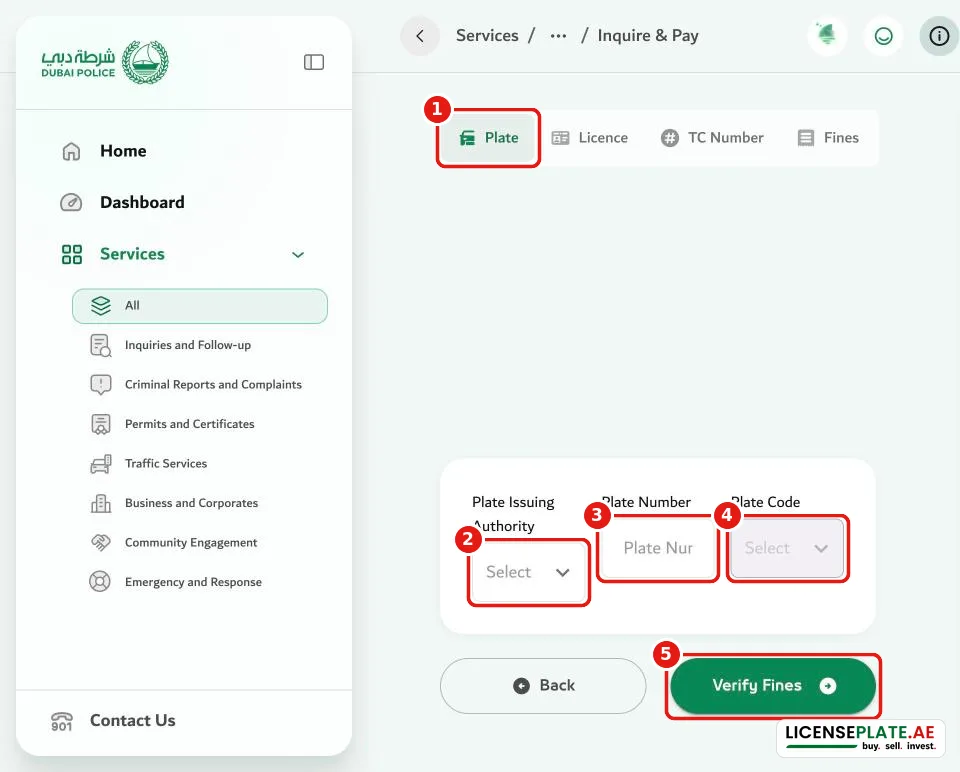
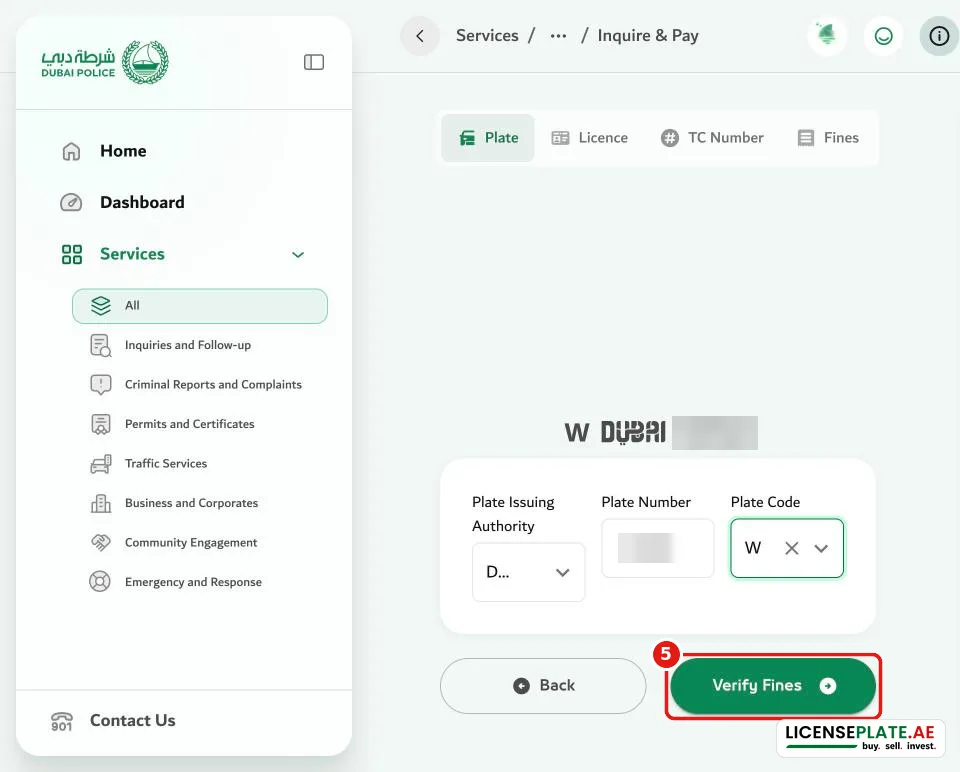
The Plate tab (1) is open by default. Fill in the three fields from left to right and press Verify Fines (5):
- Plate Issuing Authority (2): the emirate on the plate.
- Plate Number (3): the digits.
- Plate Code (4): the list opens once you have chosen the emirate.
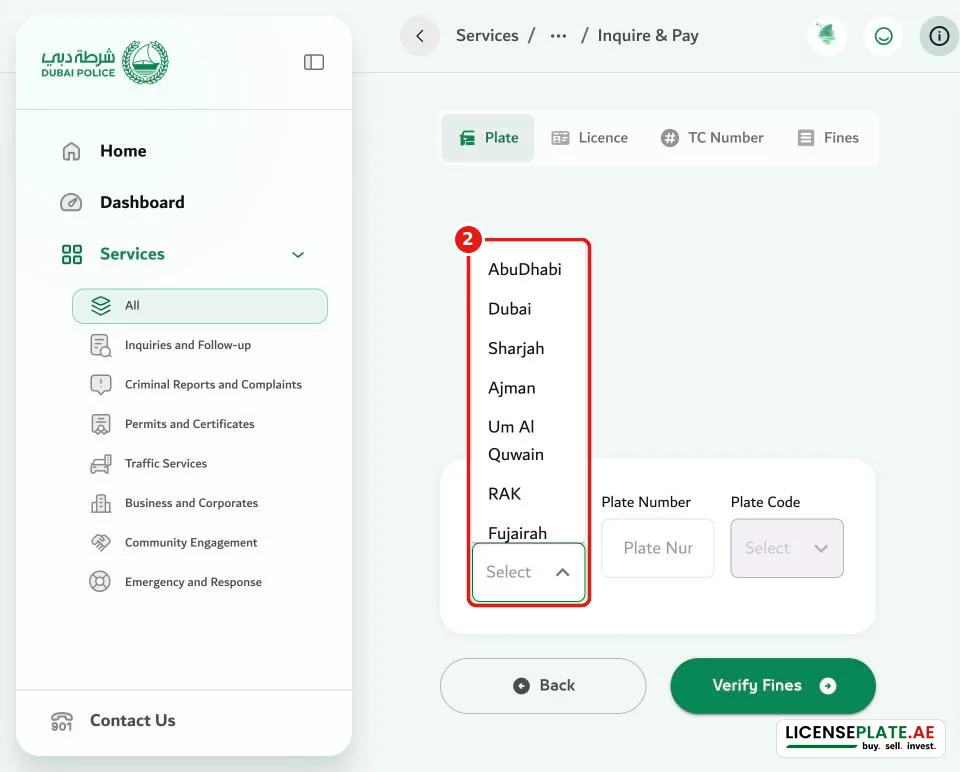
The “Plate Issuing Authority” list contains all seven emirates. You can check a Sharjah, Ajman, Ras Al Khaimah, Umm Al Quwain, Fujairah or Abu Dhabi plate here too.
After you choose the emirate, the “Plate Code” list fills with that emirate's codes. Dubai's list starts with the motorcycle codes, followed by the letters.
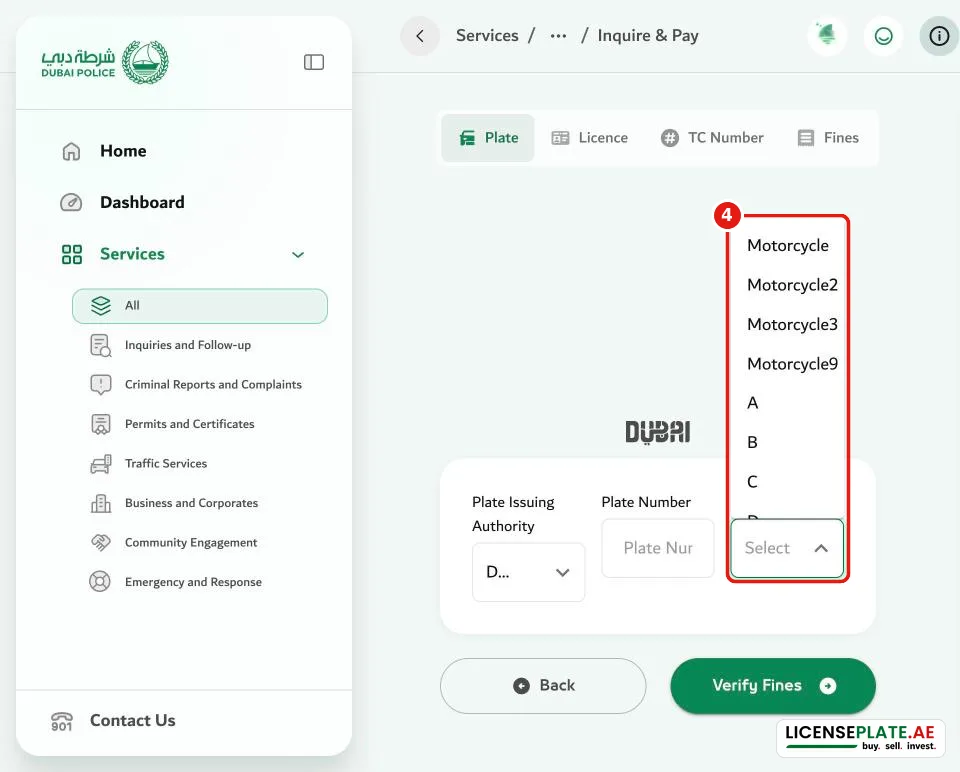
Above the form, a small preview shows the plate as you entered it. Compare it with your real plate before you press “Verify Fines”.
Step 3: read the result
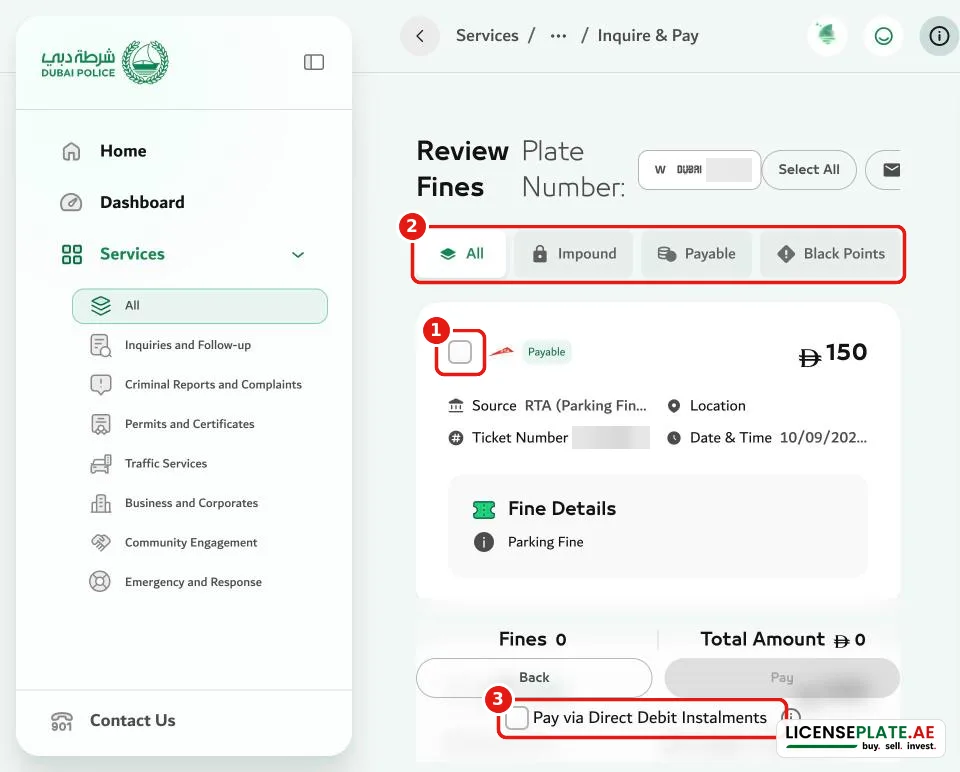
The “Review Fines” page lists every fine on the plate. Each fine card shows the amount, the source (who issued it, for example “RTA (Parking Fines)”), the ticket number, the location, the date and time, and the fine details. The tabs (2) filter the list:
- All: every fine.
- Impound: fines that come with a vehicle impoundment.
- Payable: fines you can pay online right now.
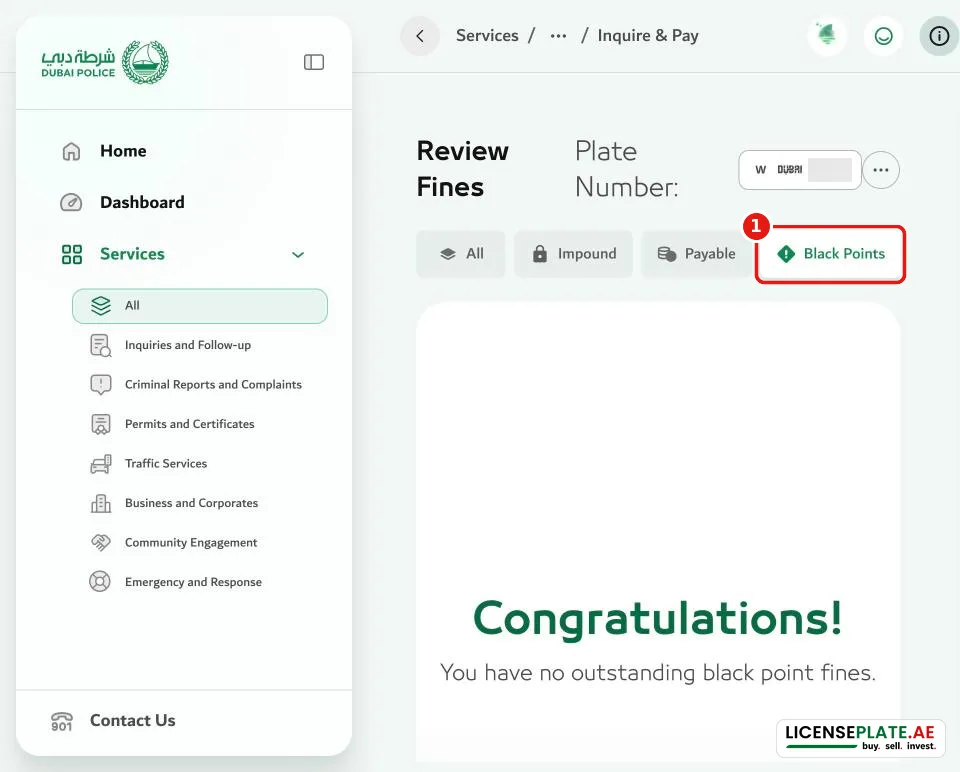
- Black Points: fines that carry black points.
Step 4: select and pay
Tick the fine (1). “Fines” and “Total Amount” update, and the Pay button (2) becomes active. Below it, “Pay via Direct Debit Instalments” switches to the Dubai Police instalment service (see “Paying” below).
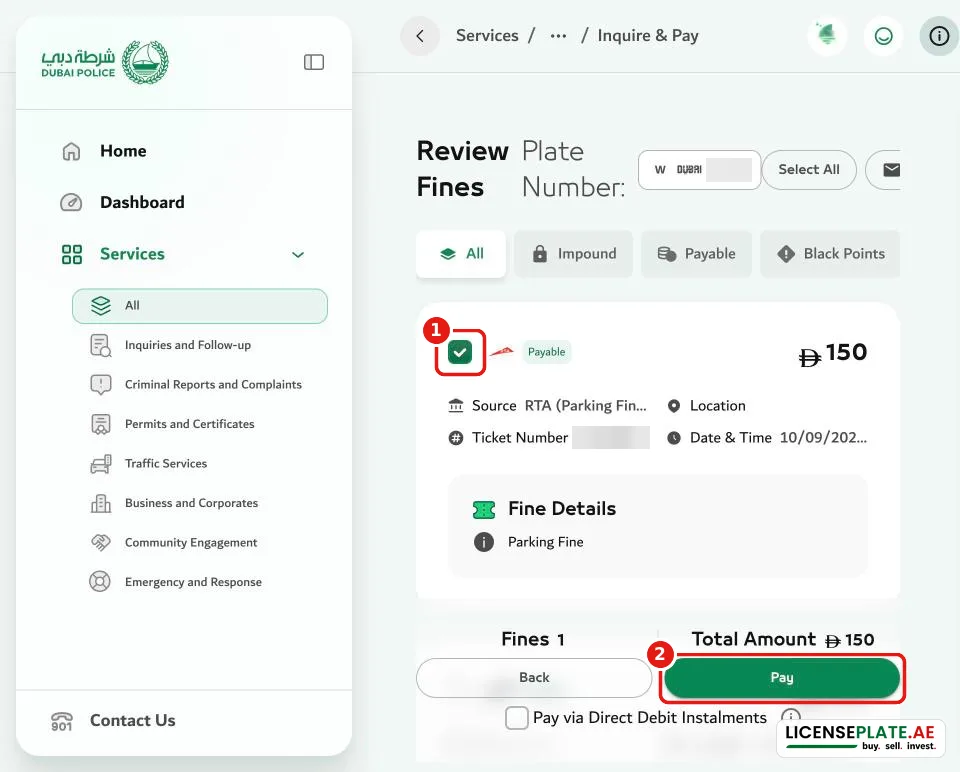
We stopped here: the next screen asks for card details. Dubai Police accepts debit and credit cards and Apple Pay. Its terms say that cards issued outside the UAE and GCC are not accepted online.
Other ways to search on Dubai Police
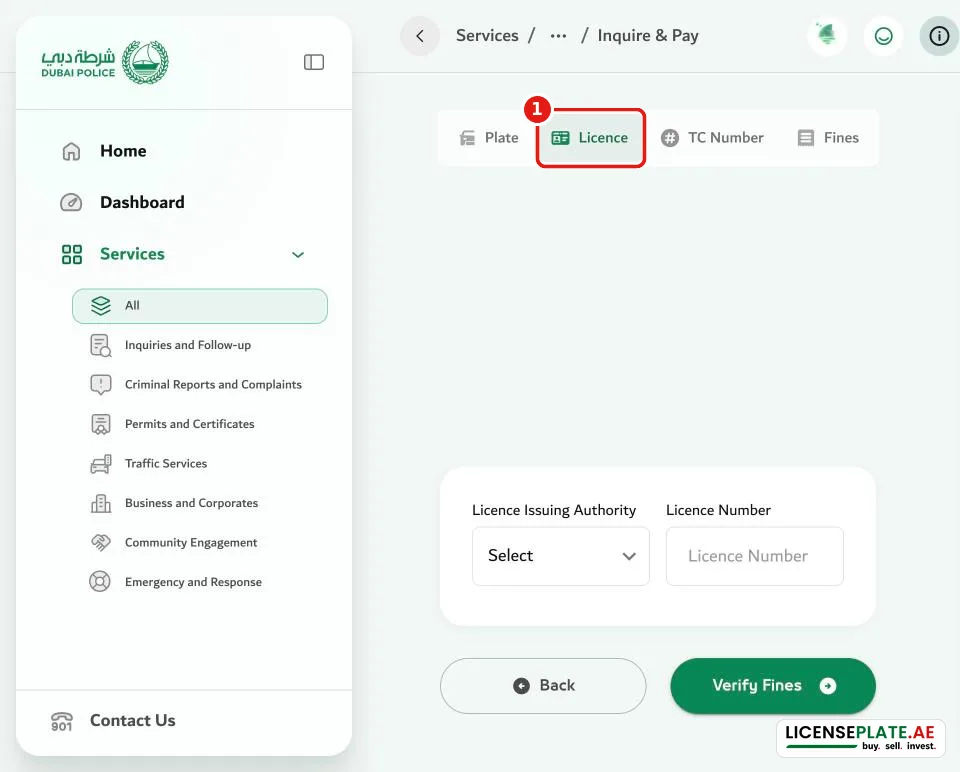
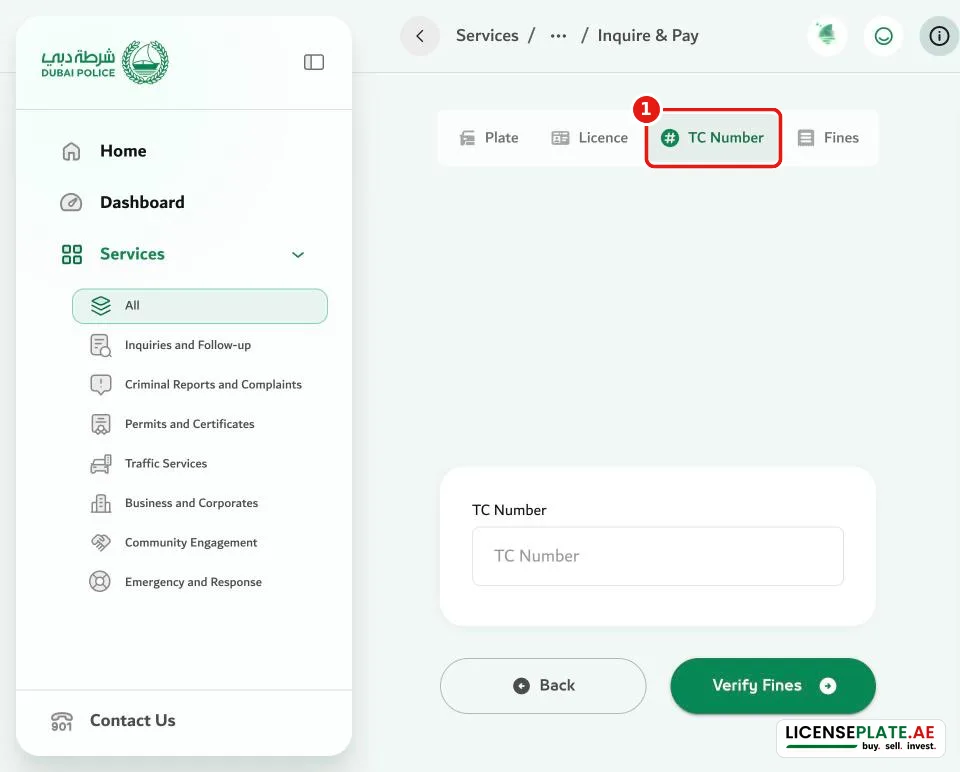
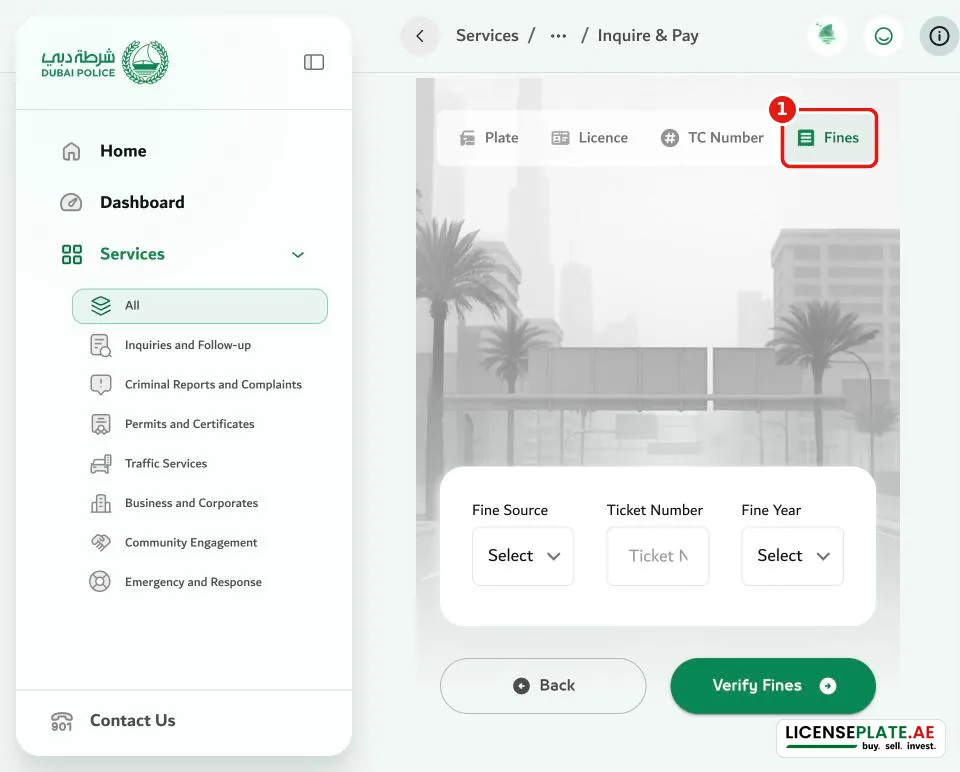
The tabs at the top switch the search type:
- Licence: Licence Issuing Authority plus licence number. This shows the fines on you as a driver.
- TC Number: the traffic code number. Use it to see every vehicle registered to one person or company.
- Fines: Fine Source, Ticket Number and Fine Year. Use it when you have a ticket in your hand.
RTA fine check (ums.rta.ae): step by step
The RTA “Fines Inquiry and Payment” page is the second official way to do an RTA fines check. It also lists RTA's own fines, such as parking fines and Salik toll fines, so it doubles as an RTA parking fine check. In our test RTA showed one more fine than Dubai Police (see “Why the two portals can show different fines” below).
Step 1: open the page and choose the plate source
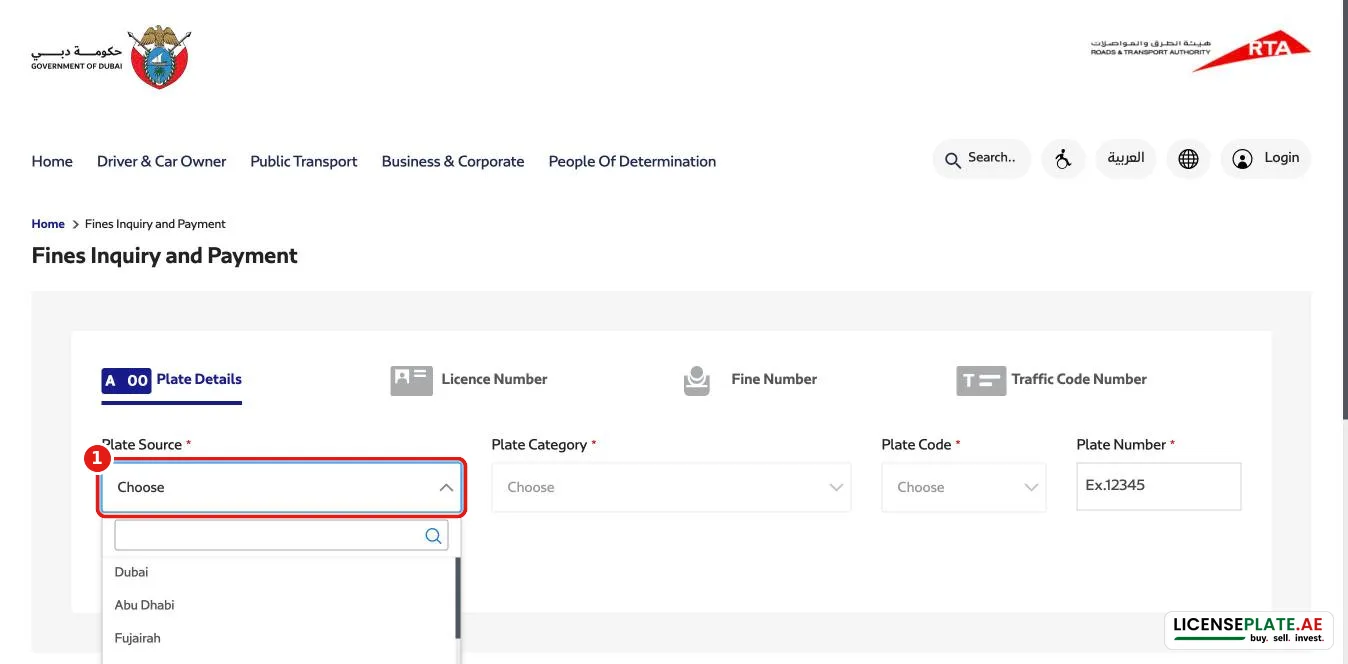
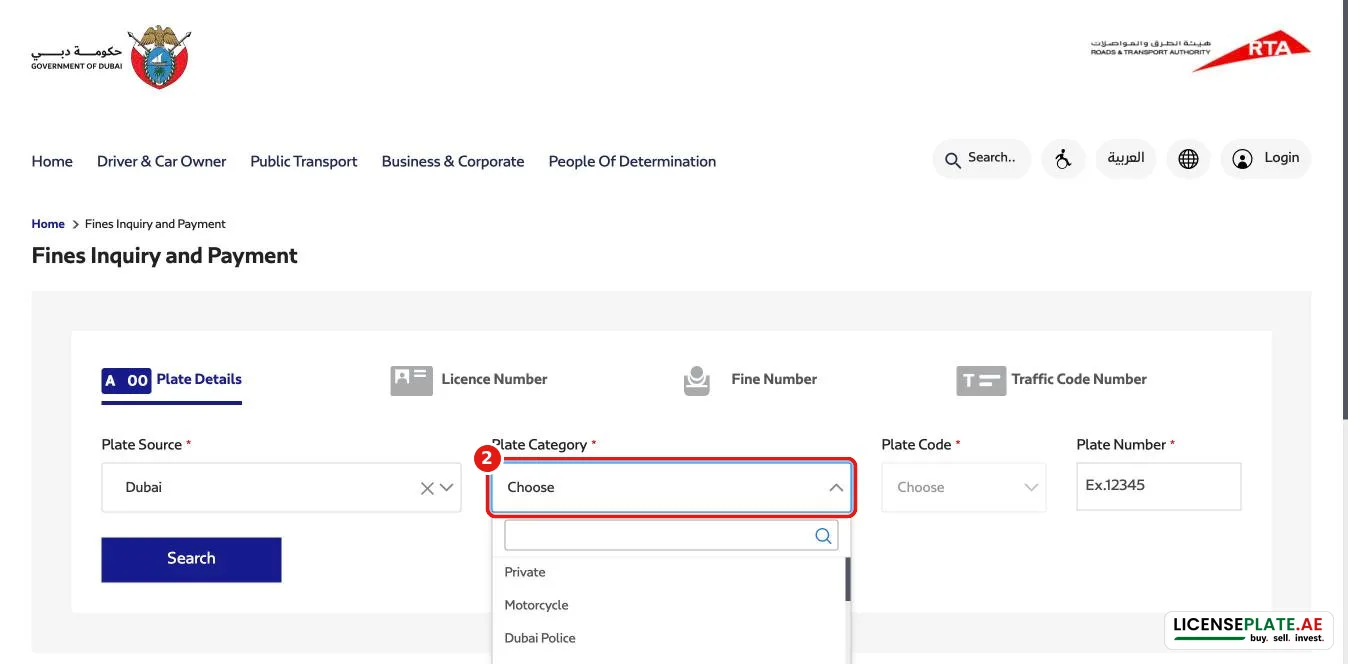
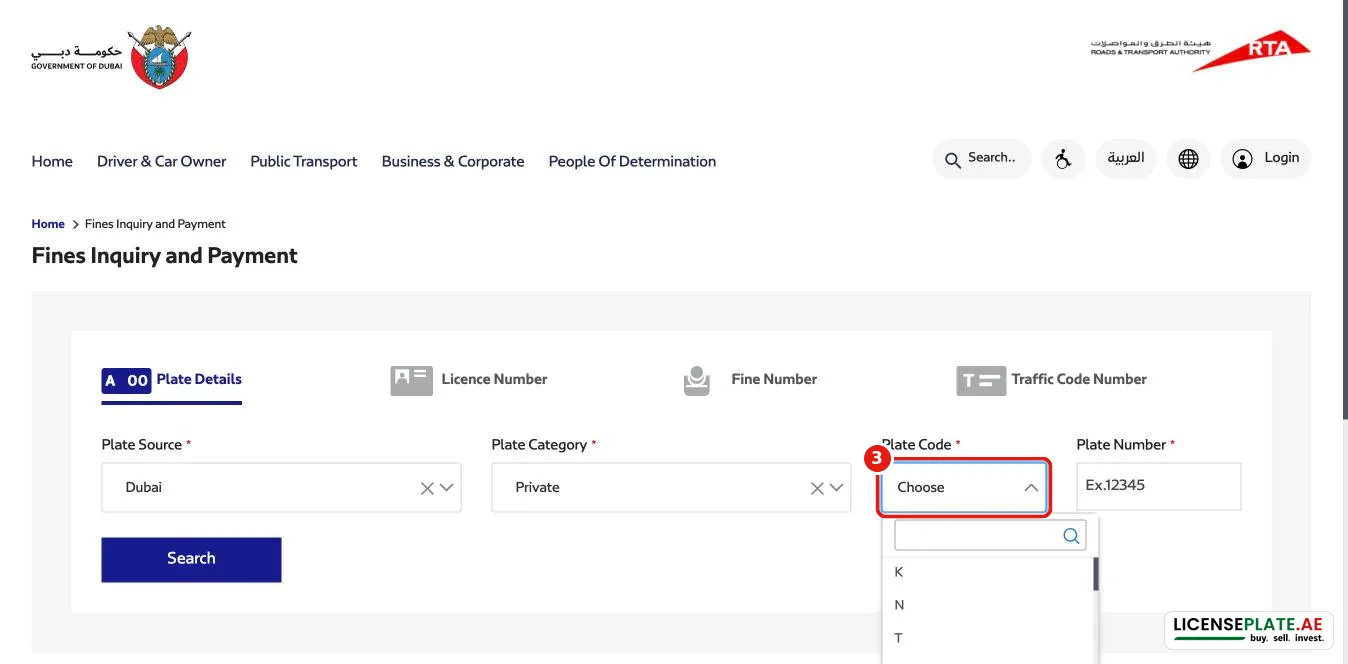
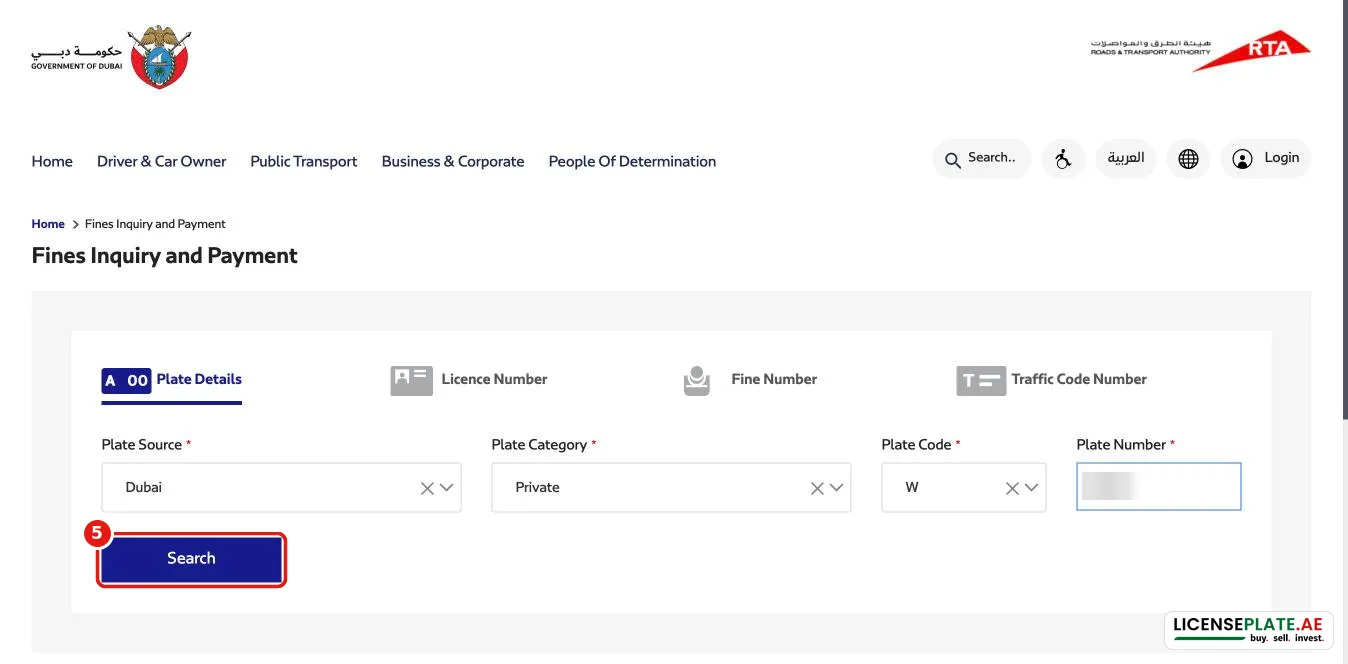
Open ums.rta.ae/violations/public-fines/fines-search. The Plate Details tab has four fields, then Search (5): Plate Source (1), Plate Category (2), Plate Code (3) and Plate Number (4).
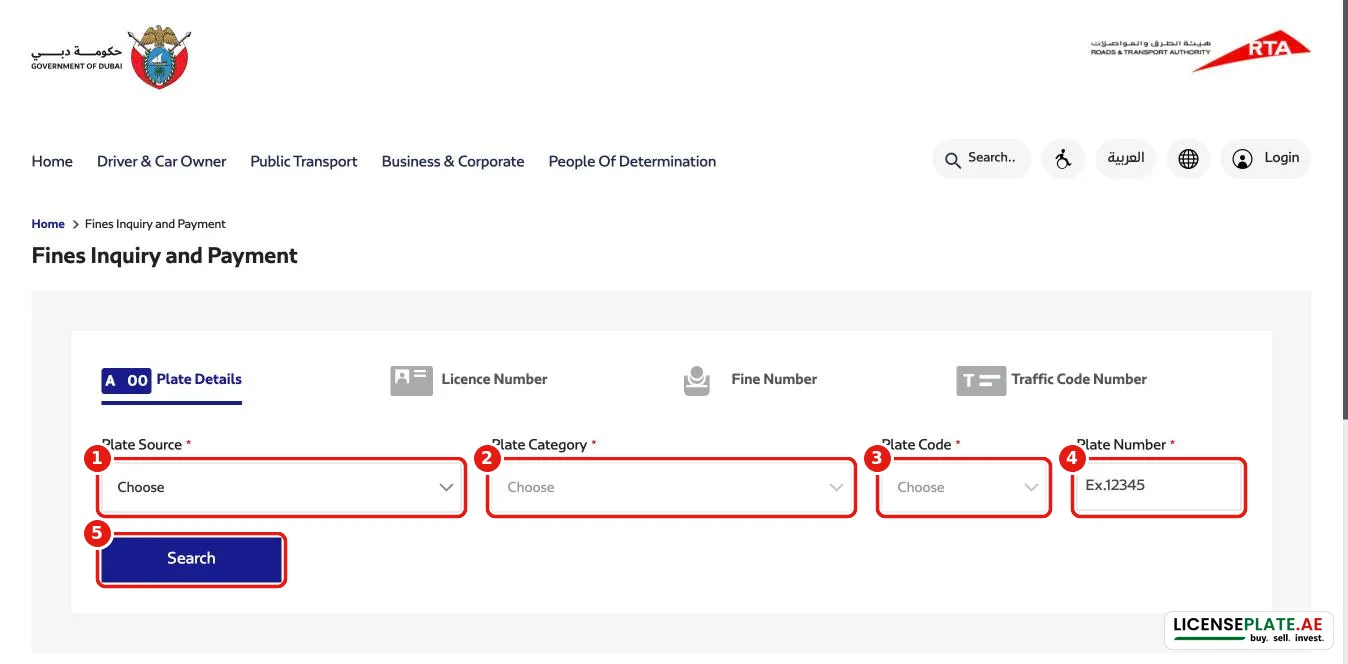
The Plate Source list is searchable: type the first letters of the emirate.
Step 2: plate category and plate code
For a normal car choose Private. The list also contains Motorcycle, Taxi, Public Transport and further categories. A wrong category is the most common reason for “no fines found”.
Step 3: enter the number and search
Step 4: read the RTA result
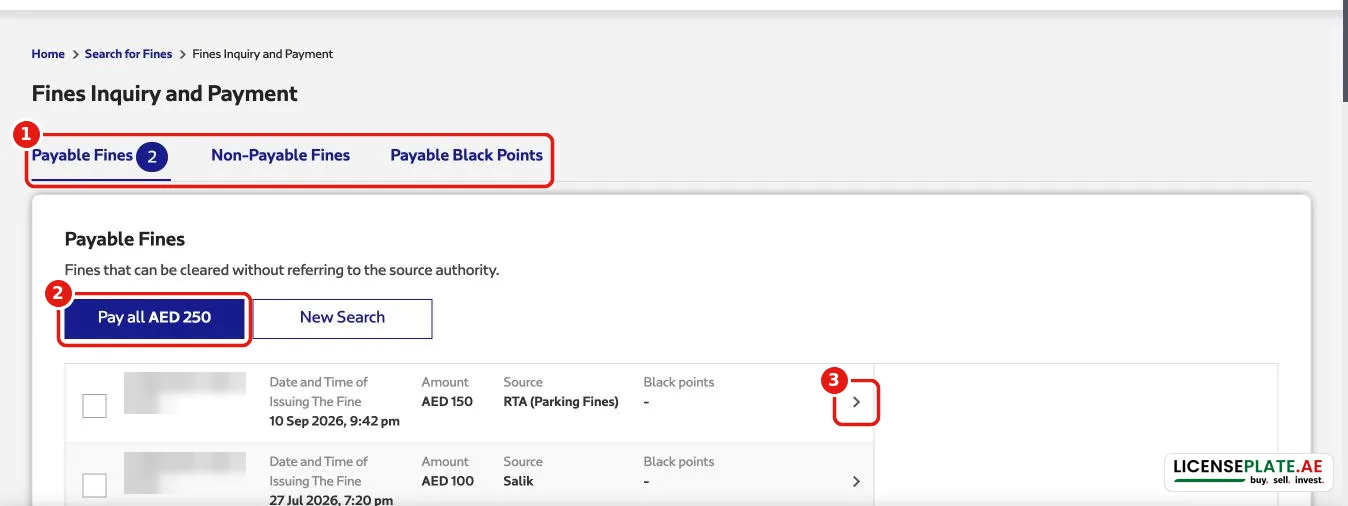
The result has three tabs (1): Payable Fines (with a counter), Non-Payable Fines and Payable Black Points. “Payable Fines” are fines that can be cleared without referring to the source authority. “Pay all” (2) pays every payable fine at once. The arrow (3) opens the details of a single fine.
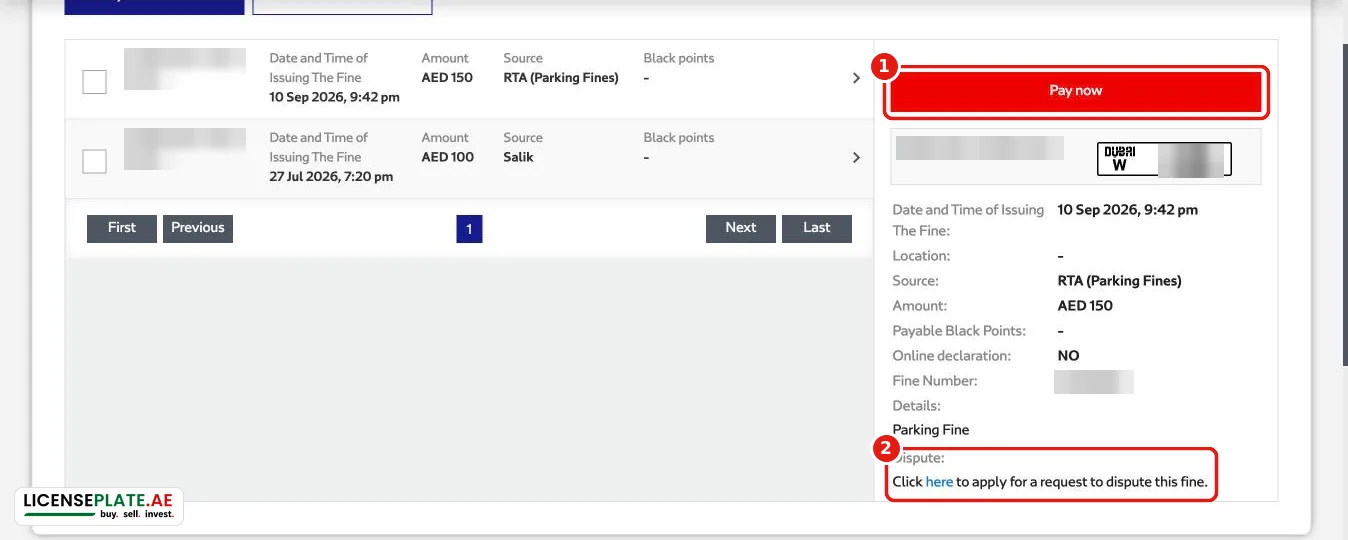
The detail panel shows the date, location, source, amount, payable black points, fine number and details. It has a Pay now button (1). It also has a Dispute link (2) for disputing a fine you think is wrong.
Other ways to search on RTA
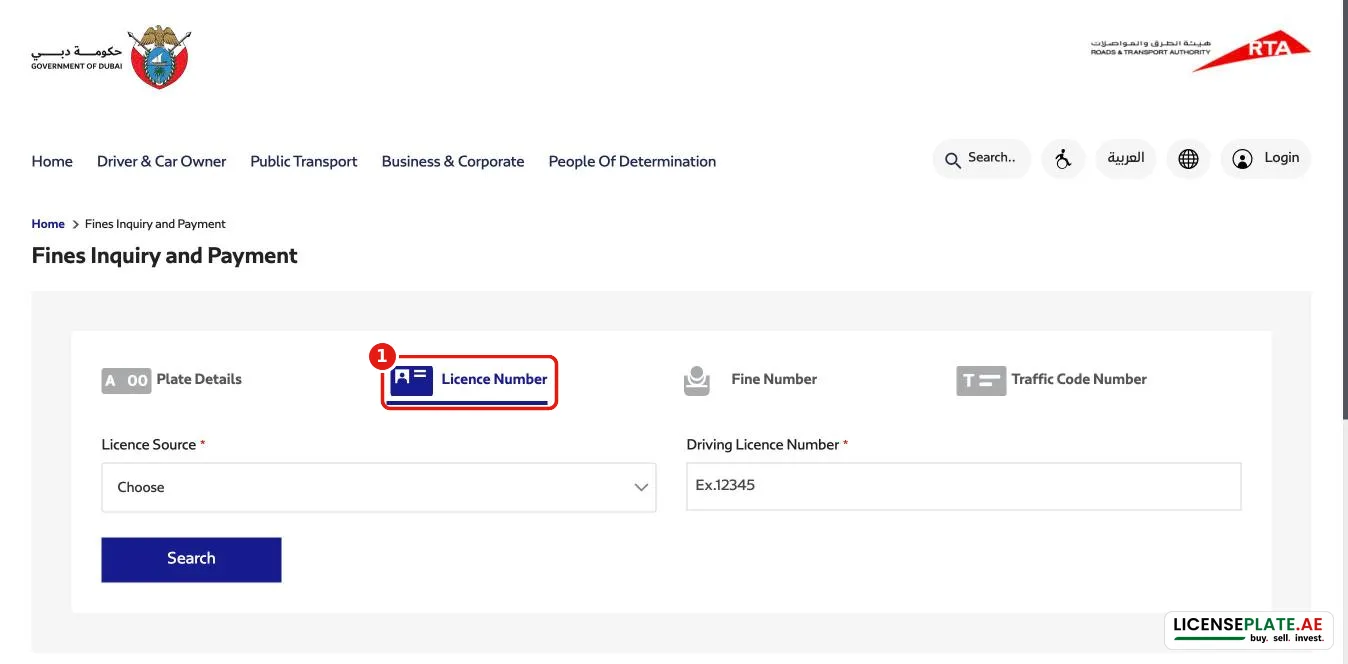
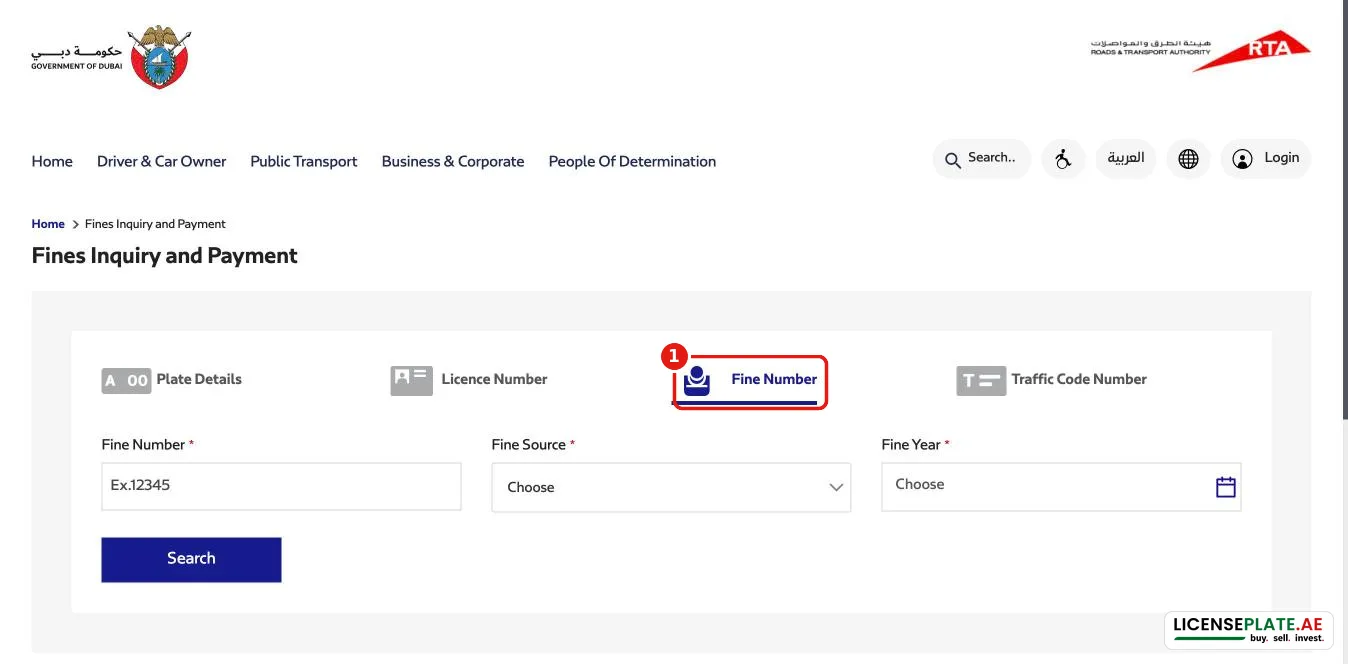
Like Dubai Police, RTA offers three more tabs: Licence Number, Fine Number and Traffic Code Number.
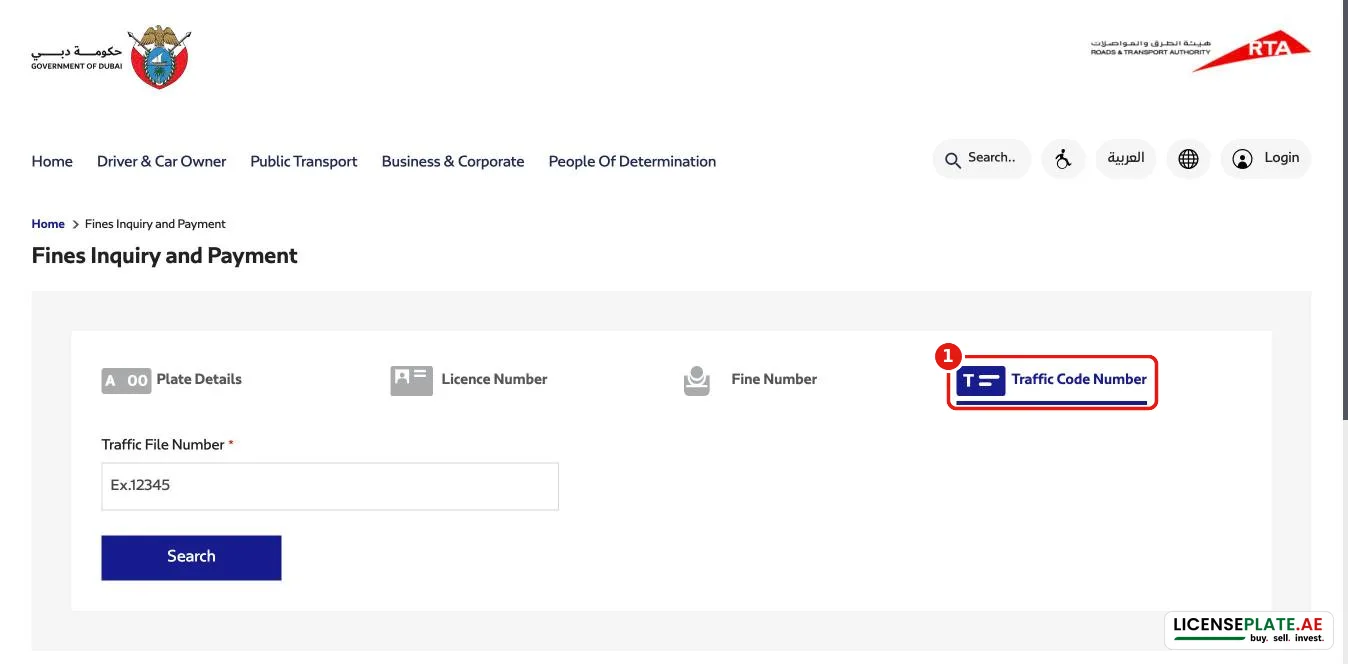
Why the two portals can show different fines
Our test with the same plate on the same day gave two different answers:
- Dubai Police showed one fine: an RTA parking fine.
- RTA showed two fines: the same parking fine plus a Salik fine.
So check both portals before you sell or transfer a car or a plate. For tolls, run a Salik balance check too.
Abu Dhabi traffic fines (TAMM and Abu Dhabi Police)
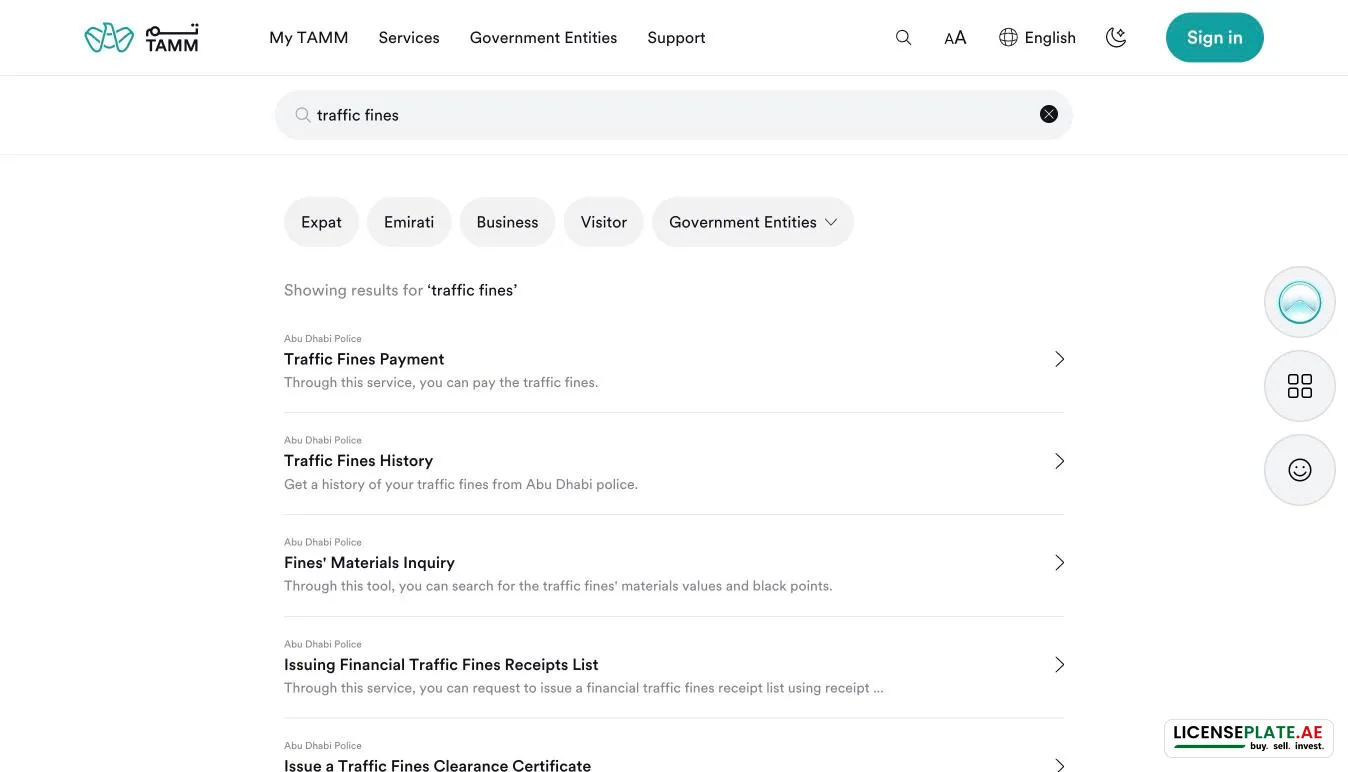
Abu Dhabi Police services run through TAMM, the Abu Dhabi government portal. Search TAMM for “traffic fines” and you get these Abu Dhabi Police services:
- Traffic Fines Payment
- Traffic Fines History
- Fines' Materials Inquiry (fine values and black points)
- Issuing Financial Traffic Fines Receipts List
- Issue a Traffic Fines Clearance Certificate
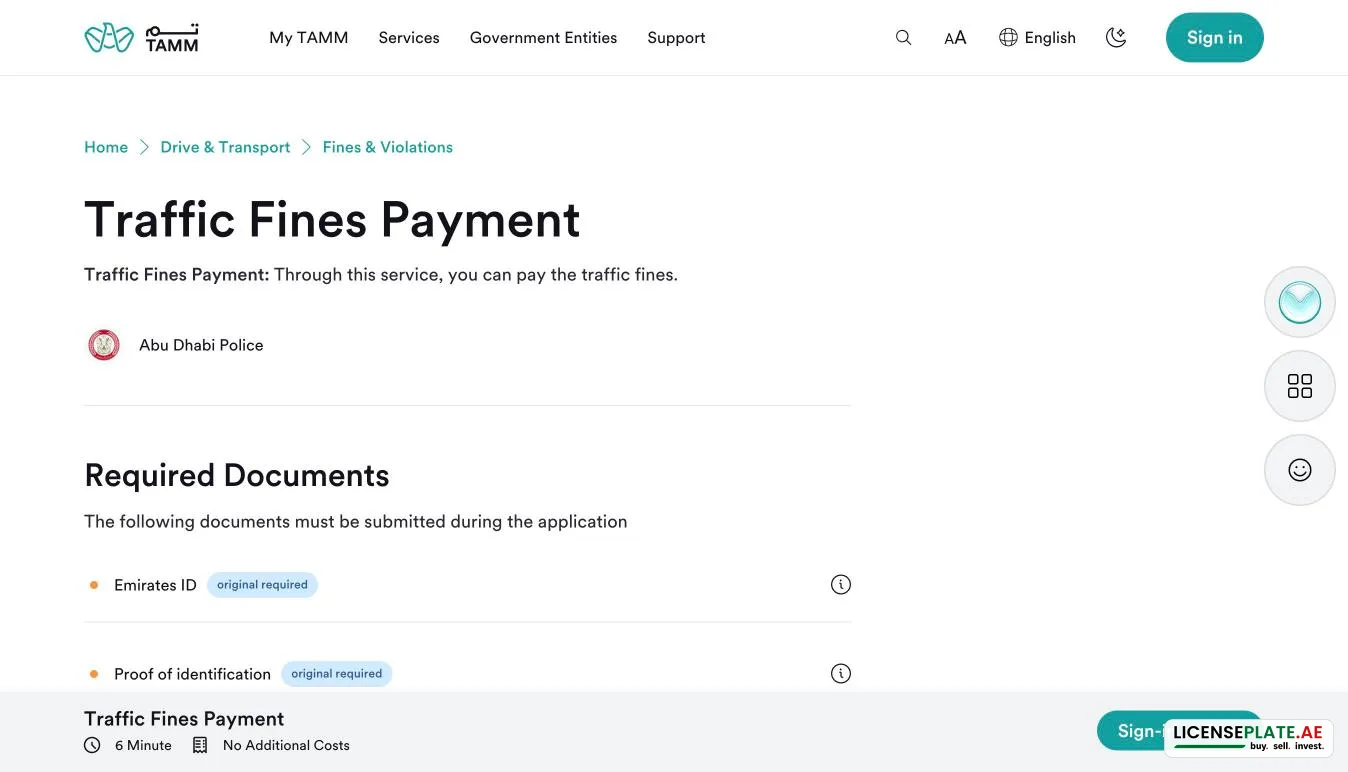
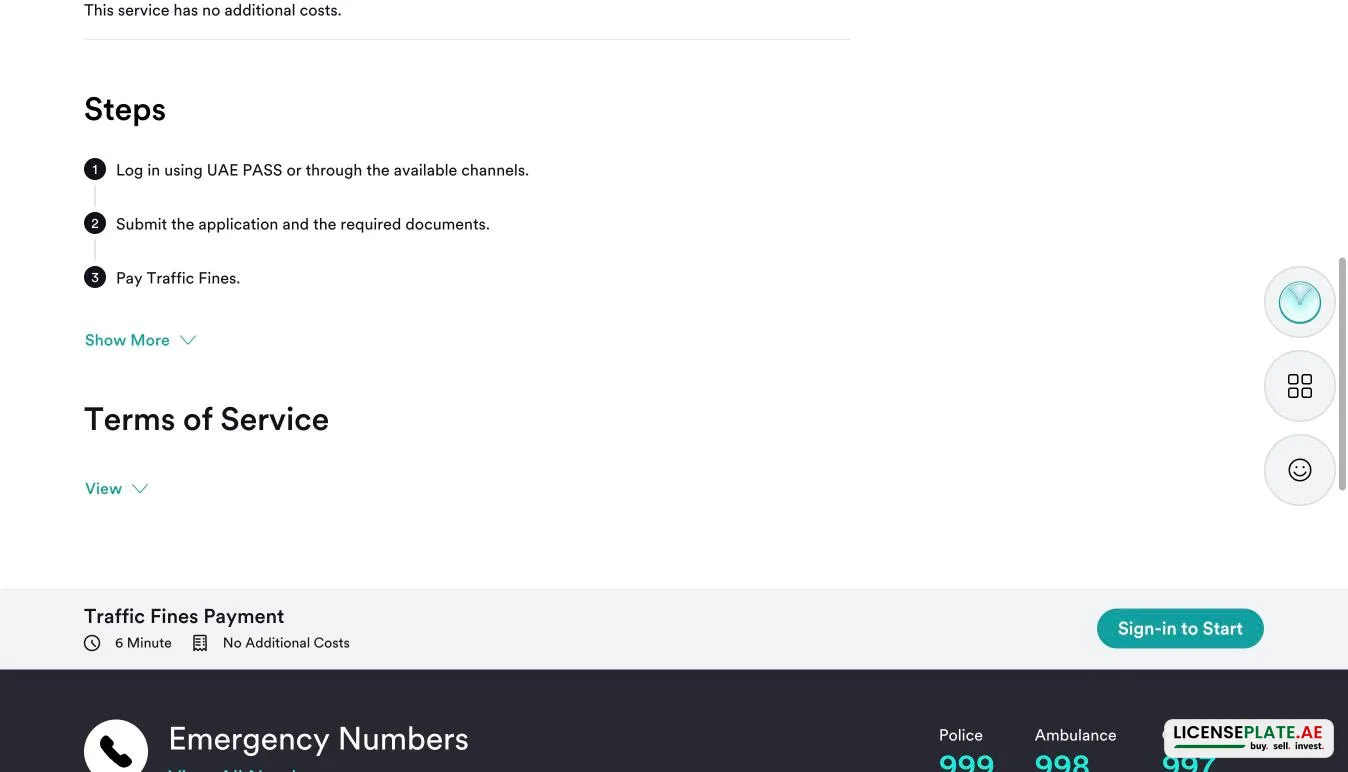
“Traffic Fines Payment” states its requirements on the service page: an Emirates ID, about six minutes and no additional costs. It has three steps: log in with UAE PASS, submit, pay. Unlike Dubai, there is no guest mode, so you need a UAE PASS account.
Without UAE PASS, you can still look up an Abu Dhabi plate without a login: choose “AbuDhabi” in the Dubai Police form (see above).
Sharjah traffic fines by plate number
For a quick Sharjah traffic fines check by plate number, use the Dubai Police form with “Sharjah” as the Plate Issuing Authority. Then enter the plate code and number exactly as in Step 2 above. No login is needed. The federal MOI UAE app of the Ministry of Interior also covers Sharjah Police fines. We could not open its website, moi.gov.ae, from outside the UAE during our test.
Ajman, Ras Al Khaimah, Umm Al Quwain and Fujairah fines
For the northern emirates, the process is the same:
- Ajman traffic fines: Dubai Police form → Plate Issuing Authority “Ajman”.
- Ras Al Khaimah (RAK) traffic fines: choose “RAK”.
- Umm Al Quwain traffic fines: choose “Um Al Quwain”.
- Fujairah traffic fines: choose “Fujairah”.
The MOI UAE app is the federal alternative for all four.
Paying: methods, fees, instalments
- Online: debit or credit card and Apple Pay on Dubai Police. According to the Dubai Police terms, cards issued outside the UAE and GCC are not accepted online.
- Fees: Dubai Police charges a knowledge fee and an innovation fee of AED 10 each per violation, on top of the fine.
- Instalments: Dubai Police offers “Traffic Fines Instalments”, monthly payments by direct debit or credit card, subject to its terms. You start it with the “Pay via Direct Debit Instalments” box on the results page.
- In person: cash or debit card at service centres and at the Smart Police Stations, which are open 24/7.
- By phone: Dubai Police call centre 901.
Discounts: Police forces announce discount campaigns on traffic fines from time to time. Each campaign has its own rules, so check the current announcement from the police of the emirate that issued the fine before you pay.
Black points: how to check them
Dubai Police has a Black Points tab on its results page. It said “You have no outstanding black point fines” for our plate. RTA shows them under Payable Black Points. Under the federal traffic law, a driver who collects 24 black points within twelve months has the licence suspended. Dubai Police also has a “Black Points Transfer” service that moves black points from a vehicle's record to a driver's record so that the fine can be settled.
Buying or selling a car or plate? Check fines first
Unpaid fines stay with the vehicle and the plate, and they must be cleared before an ownership or plate transfer. Before you buy or sell, run both checks (Dubai Police and RTA) with the seller and settle what is open. Never pay a deposit before the handover. Related guides:
- How to transfer a number plate in Dubai
- How to sell a Dubai number plate safely
- Renewing your car registration
Looking for a plate? Browse number plates for sale or check what yours is worth with the plate value calculator. Selling the car? Use Sell my car.
Problems and fixes
- “No fines found”, but you have a fine: check the plate category (Private or Motorcycle, for example) and the plate code. Then try the other portal.
- The plate code is missing from the list: choose the issuing emirate first, because the code list depends on it.
- The page says the session expired (RTA): reload the page and enter the details again.
- The card is declined: cards from outside the UAE and GCC do not work online. Use a UAE card, Apple Pay with a UAE card, or pay at a service centre.
- Rental car: fines on a rental car are registered to the rental company's plate and traffic file. The company passes them on under your rental contract.
- Company car: search by the company's TC number to see all its vehicles.
Frequently asked questions
How do I check my traffic fines in the UAE by plate number?
Open the Dubai Police “Fines Inquiry and Payment” service and choose “Continue as Guest”. In the Plate tab, choose the emirate that issued the plate and enter the plate number and plate code, then click “Verify Fines”. The form accepts plates from all seven emirates. The RTA page at ums.rta.ae works the same way and also shows Salik and parking fines.
How do I check RTA fines?
Go to ums.rta.ae/violations/public-fines/fines-search. In “Plate Details”, choose the Plate Source, the Plate Category (usually Private), the Plate Code and the Plate Number, then click “Search”. The result lists Payable Fines, Non-Payable Fines and Payable Black Points. You can pay single fines or use “Pay all”.
How do I check Dubai traffic fines without the plate number?
Both Dubai Police and RTA let you search by driving licence number, by traffic code (TC) number or by fine number. The TC number, also called the traffic file number, is printed on your vehicle registration card (mulkiya).
Can I check fines with my Emirates ID?
The public guest search works with the plate, licence, TC number or fine number. To see fines linked to your identity, sign in with UAE PASS. UAE PASS is the digital identity that uses your Emirates ID. Abu Dhabi's TAMM fine payment requires UAE PASS.
How do I check Abu Dhabi traffic fines?
Use the Abu Dhabi Police services on TAMM, such as Traffic Fines Payment and Traffic Fines History. Payment requires a UAE PASS login and an Emirates ID, and TAMM states no additional costs. To look up an Abu Dhabi plate without a login, choose “AbuDhabi” in the Dubai Police plate search.
How do I check Sharjah traffic fines by plate number?
In the Dubai Police plate search, choose “Sharjah” as the Plate Issuing Authority. Then enter the plate code and number and click “Verify Fines”. The federal MOI UAE app is the alternative.
Why does RTA show a fine that Dubai Police does not?
The two portals do not always list the same fines. In our test, RTA showed a Salik fine that Dubai Police did not list. Before a sale or transfer, check both.
Is there a discount on traffic fines in Dubai?
Discount campaigns are announced by the police from time to time, each with its own conditions. Check the current announcement from the police of the emirate that issued the fine before you pay.
Can I pay traffic fines in instalments or with Tabby?
Dubai Police offers “Traffic Fines Instalments”: monthly payments by direct debit or credit card, subject to its terms. Tabby is not among the payment methods Dubai Police lists for fines. Those are cards, Apple Pay, and cash or debit card at service centres.
How do I dispute a traffic fine?
Open the fine's details on the RTA page and use the dispute link (“Click here to apply for a request to dispute this fine”). Dubai Police offers a “Violation Review” service for a formal review request. It also offers “Violation Evidence Images” for radar photos.
Can I sell or transfer a car or plate with unpaid fines?
No. Open fines must be paid before an ownership or plate transfer. Check both portals with the seller before you agree on the deal.